Car games for kids & toddlers
- 3.7
- Rating
- 10.00M
- Installs
- Free
- Price
 Analysis by App-foxy
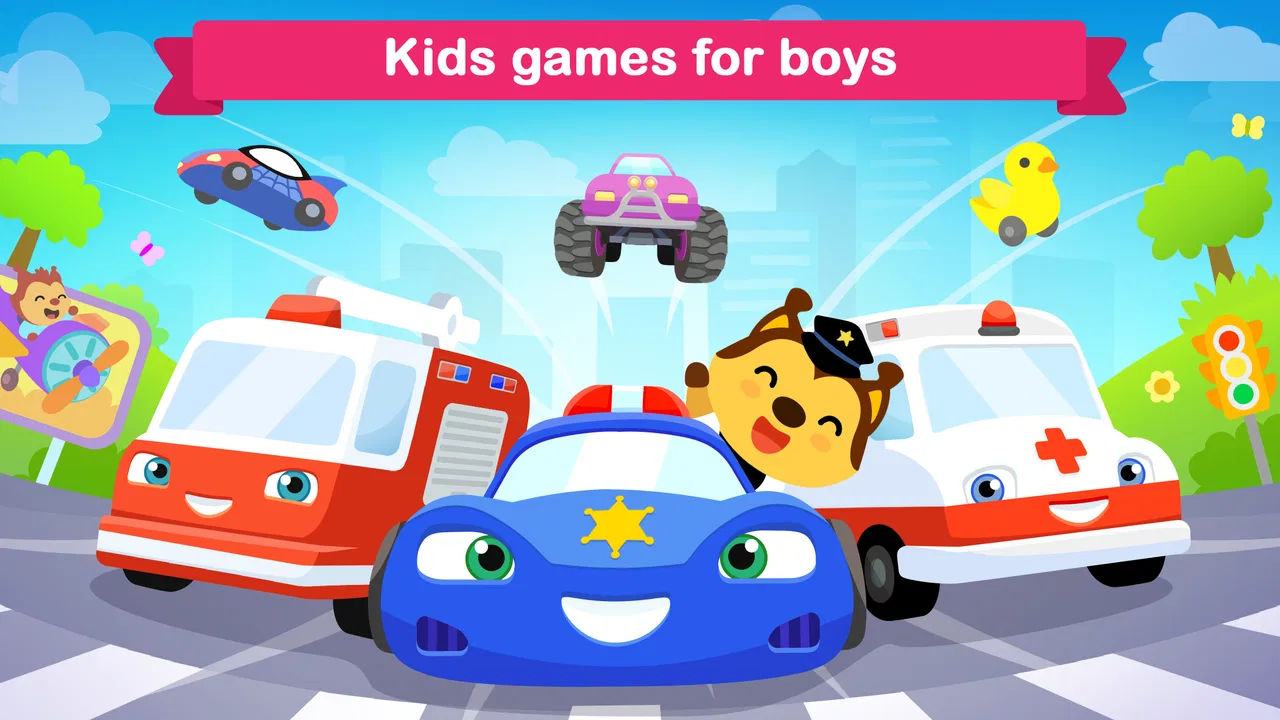
Car games for kids & toddlers is the kind of game I would use when a young child wants something active and colorful, but I do not want to hand over a complicated racing game. My overall impression is positive but specific: it works best as a simple, supervised first driving game, not as a complete learning platform or a serious racing experience. The controls are approachable, the theme is easy for children to understand, and the educational category gives it a little more purpose than a standard vehicle game.
What makes it useful is the low barrier to entry. A child between two and five can usually understand the basic idea quickly: choose a vehicle, move along a course, and enjoy the visual feedback. I found that simplicity more valuable than a long list of mechanics. At this age, frustration often comes from controls that require precise timing or reading, so a game that lets a child participate without constant adult intervention has a real place in a family’s app collection.
How the racing experience works for young children
The game is developed by Amaya Kids - learning games for 3-5 years old, and that target is visible in the way the experience is presented. This is not designed around complex menus, advanced competition, or realistic vehicle handling. It is a playful introduction to racing with cars and trucks, built around short interactions that suit a toddler’s attention span better than a long session.
You May Also Like

 Blood Strike: 2.5 Anniversary
Blood Strike’s Loadouts Turn Every Drop Into a Tactical Gamble
A close look at Blood Strike’s custom loadouts: how fast access to signature weapons reshapes its battle royale rhythm, rewards preparation, and narrows the gap between fights.

 Pandora - Music & Podcasts
Pandora’s Music Is Easy to Start, but Harder to Recover
Pandora’s strength is its low-effort path from a seed to a station. Its weak spot is how much confidence it asks you to place in connection, setup, and quiet recovery.

 8 Ball Pool
 Is Built on Rivalries, Rematches, and Routine
A close look at the rivalries, rematches, shared routines, and unanswered safety questions that turn a quick pool match into a persistent mobile community.

 Samsung Music
’s Quiet Strength Is Playing What You Already Own
Its reach comes less from spectacle than from dependable access to a personal library. That simplicity is both the app’s strongest retention engine and its ceiling.

 AccuWeather: Weather Radar
AccuWeather Review: A Quick, Clear Forecast for Everyday Decisions
For everyday plans, the best forecast is the one you can understand quickly. AccuWeather makes rain timing, radar, and local conditions easy to act on, with a few trade-offs.

 Hill Climb Racing
Why Hill Climb Racing Still Turns Crashes Into One More Run
A tiny car, a bumpy hill and one more upgrade: Hill Climb Racing keeps resurfacing because its simple chaos makes every near-miss feel personal.
More From Our News Desk
View All News


I especially like the way the vehicle theme gives children an immediate reason to explore. Many young players are naturally drawn to trucks, wheels, and movement, so the subject matter does some of the teaching work before the game even begins. A child does not need to understand a written objective to know that the vehicle should move forward and that the race should continue.
The educational value is modest, and I think it is important to describe it honestly. This is not the sort of game I would choose to teach reading, mathematics, or a structured lesson. Its learning benefit comes more from practice with attention, cause and effect, visual tracking, and basic interaction with a touchscreen. Those are useful early skills, but parents should see the game as playful reinforcement rather than a substitute for a dedicated preschool curriculum.
In everyday use, I would introduce it during a short waiting period or as a calm transition between activities. For example, if a child has finished dinner but is not ready for bedtime, a brief supervised race can provide a predictable activity without requiring a large amount of setup. I would avoid treating it as an unlimited distraction, because even a gentle game can become difficult to stop when a child is deeply engaged.
Why the simple controls matter
The strongest part of this game is its accessibility. A preschool child may not yet have the finger control needed for a conventional racing title, especially one that expects steering, braking, acceleration, and camera management at the same time. A simpler design lets the child focus on the fun of movement instead of worrying about failure caused by complicated input.
That simplicity also creates a useful parent-child activity. I can imagine an adult sitting beside a child and turning the first few races into a conversation about colors, vehicles, direction, and what happens next. Rather than taking the device away whenever the child struggles, a parent can offer small prompts such as “try that button” or “watch the truck,” allowing the child to discover the relationship between touch and movement.
One practical tip is to let the child try the controls without immediately correcting every mistake. Young players often learn faster when they can test an action and see its result. If an adult takes over too quickly, the game becomes something the parent plays for the child. The better approach is to wait, observe where the child hesitates, and help only with the specific action that is causing trouble.
Another useful approach is to keep the device stable. A toddler may press hard, shift the tablet, or hold it at an awkward angle while concentrating. A case with a firm grip or a tablet stand can make the experience less tiring for both the child and the adult. That is not a feature of the game itself, but it makes a noticeable difference in whether the child can interact comfortably.
Where it fits among children’s racing games
Compared with a typical racing game for older children, this title is much less demanding. It does not appeal to someone looking for realistic driving, deep vehicle tuning, elaborate tracks, or competitive mastery. That is a limitation if the player has already moved beyond preschool games, but it is also the reason the game can work for a first-time player.
Compared with a completely passive cartoon video, it offers more participation. The child is not only watching a character move; the child has to make choices and interact with the screen. Compared with a broad educational suite, however, it is narrower. A preschool bundle with letters, numbers, puzzles, and drawing activities may be a better single download for parents who want variety in one place.
I would also distinguish it from open-ended creative apps. Those are often better for children who want to invent stories, draw, or build their own scenes. This game is more suitable when the child specifically wants vehicles and a clear activity with an obvious beginning and end. The right choice depends less on whether one app is universally better and more on what kind of play the child is seeking at that moment.
What parents should know before installing
The game is free to install, which makes it easy to test without committing to an upfront purchase. It is rated for Everyone, and it is intended for young children, but an age rating should not be confused with a complete parenting recommendation. I would still stay nearby during the first session, both to see how the child handles the controls and to understand what parts of the experience hold attention.
There are optional in-app purchases ranging from $0.99 to $19.99 per item. That is the most important practical detail for families. Before giving the device to a child, I would check the purchase protections on the Android or iOS device and make sure the child cannot approve an accidental transaction. Even when a game is free to start, a young child may tap attractive buttons without understanding that they can lead to a purchase.
The current version is 2.33.0 and the game requires Android 6.0 or later. That makes it relevant for many older Android devices, although I would still check the device’s available storage and general condition before installing it on a very old tablet. A child’s game can feel poorly designed when the real problem is a slow device, delayed touch response, or a battery that cannot last through a short session.
The game has reached more than ten million installs, with a 3.7 average from around seven thousand five hundred ratings and one hundred eighty-seven written reviews. I read that overall reception as a sign of broad interest rather than a guarantee that every family will love it. The rating is not so high that I would recommend installing without trying it, but the large number of installs suggests that the basic vehicle concept has found a substantial audience.
Its most meaningful weakness
The biggest weakness is likely to be limited depth for children who learn the controls quickly. A two-year-old may find the simplicity reassuring, while a child near the older end of the target range may soon want more challenge, more variety, or a stronger sense of progression. If the child asks why the races feel similar or starts looking for more difficult goals, that is a sign the game has done its introductory job and may no longer be enough.
I would also be cautious about calling it a fully educational game. The category is educational, but the experience is still primarily play built around vehicles. Parents expecting clear lessons, skill tracking, or a structured sequence of preschool exercises may feel that the learning element is too light. For those needs, a dedicated early-learning app with explicit activities would be a better match.
The free entry point can create another kind of friction. Optional purchases may be reasonable for a family that wants to expand the experience, but they can make the app less straightforward than a paid, one-time children’s game. I prefer to decide in advance whether I am comfortable with any purchases, then lock the device accordingly. That small step prevents the child’s enthusiasm from turning into an unexpected billing problem.
There is also a difference between independent play and supervised play. Some children will manage the game comfortably, while others may need help understanding what to touch or what to do after a race. I would not install it expecting every toddler to sit quietly and play alone for a long period. Its best use is as a shared or nearby activity, especially during the first few attempts.
Three ways to get more value from it
First, I would use the game as a language prompt rather than letting it become silent screen time. While the child plays, I can ask simple questions about the truck, the route, the colors, or what might happen next. This turns the racing activity into a chance to practice vocabulary and sequencing without pretending that the app itself provides a formal language lesson.
Second, I would use short, repeatable sessions instead of waiting until the child is already tired. A young player who is hungry, overstimulated, or close to sleep may react badly to even easy controls. Starting with a brief session when the child is calm gives a much fairer impression of the game and makes it easier to stop on a positive note.
Third, I would compare the child’s behavior before deciding whether to pay for anything. If the child returns to the game voluntarily, explores without constant help, and still enjoys it after several short sessions, optional content may have value for that family. If interest disappears quickly, spending more will not solve the underlying problem. In that situation, switching to a drawing app, puzzle game, or broader preschool collection would be more sensible.
Who should choose it, and who should skip it
I think it is a good fit for a toddler or preschooler who loves cars and trucks, is new to touchscreen games, and benefits from immediate feedback. It is also suitable for a parent who wants a free starting point before buying a more substantial children’s game. The uncomplicated racing theme makes it easy to explain, and the short-play format fits naturally into small gaps in a family routine.
I would skip it if the child needs a strong academic focus, becomes frustrated by repetition, or already expects the depth of an older child’s racing game. I would also choose another option if the main goal is creative expression, because a drawing or building app would offer more room for imagination. Families looking for a single app that covers many preschool subjects should consider a broader learning collection instead of relying on this vehicle-focused experience.
For iOS users, the same decision comes down to the child’s age, interest, and tolerance for simple play rather than the platform alone. Android users should pay attention to the minimum operating-system requirement and configure purchase controls before handing over the device. In either case, I would treat the download as a trial: watch how the child responds, then decide whether it deserves a regular place in the routine.
My final view
After looking at the game as both a parent-friendly activity and an educational product, I see it as a focused first step into digital racing. Its appeal is not complexity; it is the fact that a small child can understand the vehicle theme and begin interacting without a long explanation. That makes it more approachable than many conventional racing games and more active than simply watching a cartoon.
At the same time, the modest rating and the possibility of limited long-term challenge are worth keeping in mind. I would not present it as a complete preschool learning solution, and I would not pay for optional content before confirming that the child actually returns to the game. The purchase range, from $0.99 to $19.99 per item, makes device-level safeguards especially worthwhile.
My recommendation is clear: choose it as a simple, supervised car game for a young child, not as an all-purpose educational app. If your child is fascinated by trucks, needs an easy introduction to touchscreen play, and enjoys short activities, it is worth trying. If you want deep racing, formal learning goals, or extensive creative freedom, another category will serve you better. For the right preschool audience, though, Car games for kids & toddlers offers an accessible way to turn a child’s interest in vehicles into a small, manageable play session.
FAQs for Car games for kids & toddlers
01What is Car Games for Kids & Toddlers?
Car Games for Kids & Toddlers is a collection of simple driving-themed activities designed for young children. It typically combines colorful vehicles, easy controls, playful sounds, and short challenges that let children drive, explore, decorate, or interact with different cars. The experience is aimed at entertainment and early motor-skill practice rather than realistic racing or complicated gameplay.
02Is Car Games for Kids & Toddlers suitable for young children?
The game is generally designed for preschoolers and toddlers, with large buttons, bright graphics, and straightforward interactions that are easy to understand. However, the ideal age can vary depending on the child’s ability to follow instructions and use a touchscreen. Parents should check the store’s age rating and try the game themselves before allowing unsupervised play.
03Does the game require an internet connection?
Many activities in Car Games for Kids & Toddlers can usually be played offline once the application has been installed, which makes it convenient for travel or areas with limited connectivity. Some features, advertisements, updates, or optional content may still require internet access. It is best to launch the game before going offline to confirm which activities remain available.
04Are there advertisements or in-app purchases?
Depending on the version and platform, Car Games for Kids & Toddlers may include advertisements, paid upgrades, or optional in-app purchases. This is especially important when children use a shared phone or tablet. Parents should review the app’s store listing, enable parental controls, and restrict unauthorized purchases. A paid or ad-free version may be available in some regions.
05What can children learn or practice while playing?
Although this is primarily an entertainment app, its activities may help children practice hand-eye coordination, tapping accuracy, visual recognition, and basic cause-and-effect understanding. Some modes can also introduce colors, shapes, sounds, and simple problem-solving. It should not be considered an educational replacement for guided play, but it can provide a short and engaging activity when used appropriately.
Pros
- Simple controls are easy for toddlers to understand and use.
- Bright visuals and playful sounds keep young children engaged.
- Short races suit children with limited attention spans.
- Offline play makes it useful during travel or without Wi-Fi.
- Gentle gameplay avoids stressful competition and difficult challenges.
Cons
- Some features may be locked behind in-app purchases.
- Repetitive tracks can become boring for older children.
- Sound effects may be too loud without parental adjustment.
- Ads could appear if the free version is supported by advertising.
- Limited customization may reduce replay value over time.

Car games for kids & toddlers
Gallery